
AI workflowLLMSoftware deliveryAI agentsSDLC
From Vibe Coding to AI Workflow: What Controls an Agent?
DC
Dominik Czerwiński
· 15 min read
In the first post, I explained why a single prompt is not enough in a larger project. The natural next step is an agent, but that word gets used very broadly. Before talking about tools and configuration, we need to define what we actually mean by an agent in AI-assisted software work.
What is an AI agent, really?
There is no single definition of an agent that works the same way in every tool. For this post, a good starting point is the definition from OpenAI:Agents are the core building block in your apps. An agent is a large language model (LLM) configured with instructions, tools, and optional runtime behavior such as handoffs, guardrails, and structured outputs.
Agent as a concept, not an implementation
I do not treat an agent here as a specific file, a mode in an IDE or a feature of one tool. The same mechanism can be packaged differently in Copilot, Claude Code or an application built directly on the SDK. File names, modes and settings will differ, but the underlying problem is the same: how to control the model's work, context, tools, constraints and output.What shapes an AI agent's work?
Several groups of elements shape how an agent works. This is not an official taxonomy from any one tool's documentation. It is a practical model that helps check whether an agent has the right configuration, the right context and clear work boundaries.Agent configuration
These elements define how the agent works, regardless of the current task.- Model - You may use one model for exploration, another for implementation and another for architecture review. The choice affects cost, speed and reasoning quality.
- Role and responsibility - The agent should have a defined role: whether it explores, prepares a spec, implements, reviews code or simply answers a question.
- Standing instructions (system instructions / system prompt) - Rules that always apply or apply to a given type of work: architectural requirements, test style, project conventions, communication style and output formatting rules.
- Context discovery rules (context discovery / retrieval guidance) - Guidelines defining where the agent should look for missing information, what sources to use and when to stop exploring.
- Tools and permissions (tools / tool definitions) - Access to files, editing, terminal, tests, MCP, APIs or other sources. The LLM itself does not perform these actions. That is the runtime's job: it exposes the tools and enforces part of the constraints.
- Expected output - A definition of what the agent should leave behind: code, a spec, a summary, a verification result or material for the next step.
Task-specific input
These are things the agent receives at the start of a given task.- User prompt - The current request: what needs to be done now.
- Task context - A ticket, acceptance criteria, bug description, open files, current diff, spec or a previous artifact.
- Local instructions - Rules that apply only to this task: for example, the scope of the change, constraints or areas that should not be touched.
- Handoff from the previous step - Input material produced earlier: a spec, exploration summary, review notes or the output of a previous session.
Context retrieved during work
These are elements the agent does not need to know at the start, but can find or receive during execution. In agentic systems, this is closer to retrieved context and tool observations than to a manually prepared prompt.- Files and documents (retrieved context) - Code fragments, documentation, configuration files, tests or other materials read during the task.
- Tool results (tool results / observations) - Results from searches, commands, tests, builds, linters or external APIs.
- Errors and constraints discovered along the way - Missing dependencies, code inconsistencies, outdated documentation or edge cases not mentioned in the original task description.
Output and artifacts
What the agent creates or leaves behind.- Project changes - Code, tests, configuration, documentation or other modified files.
- Summaries and notes (working notes / intermediate artifacts) - Implementation summary, decision notes, exploration summary, review findings or the result of an analysis.
- Handoff artifact - Output prepared to become the input for the next step, agent or session.
Guardrails and verification
These are elements that constrain the agent's work or check its results.- Guardrails - Rules defining what the agent should not do or what requires approval: restricted files, destructive commands, public API changes, access to sensitive data, operations outside the task scope.
- Technical verification - Tests, build, lint, typecheck, schema validation or other automated checks.
- Requirements and architecture verification - Acceptance criteria, architecture review, alignment with requirements and project decisions.
How an AI agent actually works
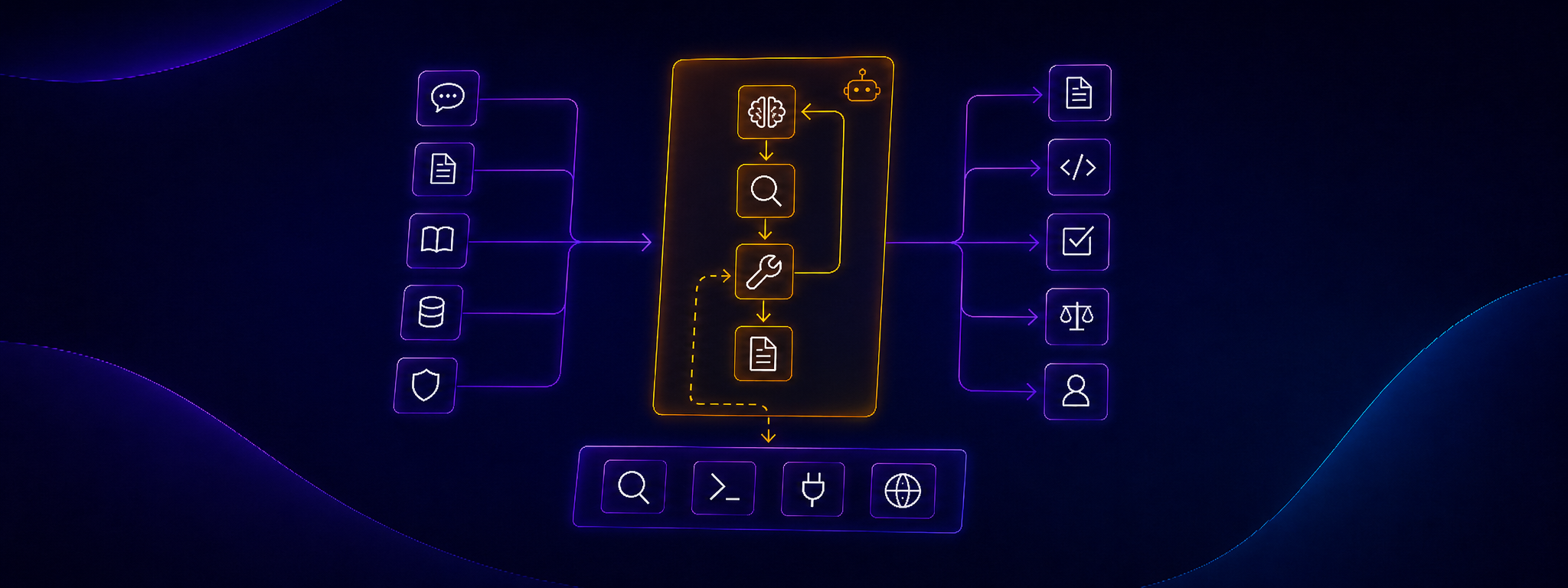
With these elements defined, let's see how they operate in practice. An agent does not operate as a single, continuous stream of reasoning. In practice, it is a loop between the runtime, the model and the tools. The runtime is the control layer: a CLI, IDE, web application, agent framework or a custom script. It is responsible for the technical side of the agent's work: preparing the input for the model, handling tools, passing results and enforcing part of the constraints. In simplified form, it looks like this:- The runtime assembles the model input. It takes the agent configuration, task input, available context, session history and descriptions of the tools the agent can use.
- The model analyzes this state and generates the next step. It can respond with text, propose a change or return a tool call request.
- If a tool is needed, the model does not perform the operation itself. It returns a structured tool call to the runtime - for example to read a file, search for a code fragment or run tests.
- The runtime executes the action outside the model. It reads the file, runs the command, calls the API or uses MCP. The runtime also enforces permissions and can stop the operation if it goes beyond the allowed scope.
- The tool result goes back into the next step. The runtime adds it to the context and sends the next input to the model. From this point, the model can work on new information: the retrieved file, a test failure, a search result or a command log. The loop starts again.
Context flow, not just input
With the runtime loop in mind, the agent's context is clearly not static. With each step, it can grow by adding files, tool results, logs, errors, recorded decisions and artifacts from previous steps.- Input should match the agent's role. A spec writer needs different information than an implementer, and a reviewer needs different information than an explorer. Dumping everything into every agent may feel safe, but it often adds noise and burns through the context window without real benefit.
- Exploration must have boundaries. The agent should know where to look, what to look for and when to stop. Without that, it can read a lot of files, find accidental similarities and build conclusions on material that has nothing to do with the task.
Output, artifacts and handoff
Since an agent works in a loop, its output is not just a final answer. In larger tasks, output often serves two roles: it is the result of the current step and at the same time the input material for the next one. The most obvious output is code, but intermediate artifacts are equally important in agent work. The goal is not documentation for its own sake. An artifact should help the work continue, not just look like a trace of something that was done. In practice, an artifact should do at least one of three things:- Support human review - A good artifact shows things that can be quickly checked: decisions made, assumptions, example API requests, an algorithm diagram, a list of changed areas or edge cases the agent accounted for.
- Be a precise input for the next step - A good artifact should reduce the need to reconstruct the conversation history. The next step should receive clear input material, not have to guess what was agreed earlier.
- Support control within a standard SDLC process - An artifact can contain test results, verification status, a list of unmet acceptance criteria or a clear approve/reject recommendation. This makes it easier to stop a change during review, in CI or before merge, instead of pushing a flawed output further.
Start simple
It is easy to over-design the workflow on day one. When you have agents, tools, handoffs, guardrails and artifacts, it is tempting to design the whole process at once: an analysis agent, a spec agent, an implementation agent, a test agent and a review agent. But that often does not solve the problem. Sometimes it just moves the chaos from one prompt to several named agents. Usually, one agent or one simple working mode is enough to start. That agent can prepare a change, run tests and do basic self-review. In a small task, that is often sufficient. What matters more than the number of agents is whether the agent has clearly defined:- what role it has,
- what rules it should follow,
- where to look for missing context,
- what it should not do,
- what it should leave behind,
- how the result should be checked.