
AI workflowLLMSoftware deliveryVibe codingSDLC
From Vibe Coding to AI Workflow: Why a Single Prompt Is Not Enough
DC
Dominik Czerwiński
· 11 min read
AI can quickly make software development look easier than it really is. You type a prompt, get code, and sometimes even a complete working project. With a small project or an isolated part of a system, everything looks good. This becomes a problem when that code has to fit into an existing system that already has its own rules, past decisions, and constraints - not an empty repository.
Vibe coding is impressive. At first.
It's easy to be impressed by AI when a single prompt produces a working project. It can create a monorepo, configuration, packages, an example page, a few components, a basic design system. Something that previously took several hours or days is ready in minutes. Often, this happens in a technology we don't know well yet, with libraries we haven't used before. At first, everything looks promising. We add the first changes, fix details, add new features. We do some things manually, but hand more and more of the work to AI. The application grows: new screens, new components, new use cases. From the outside, it looks like fast progress. The problems start to show later, when we begin looking more carefully at the whole system. One button looks different from the rest. Headers have different styles. Validation in one place works differently than in another. One endpoint returns errors in a different format than the rest of the API. Tests check implementation details, but not business behavior. Each piece looks reasonable on its own, but together they form a system without clear rules. AI did not create these problems. They existed in projects before - AI can simply replicate them and spread them across the codebase much faster. Then the second phase starts: fixing previous changes. We ask it to fix one place, then to find similar cases, then to make the structure consistent. Each iteration fixes something, but often moves the problem somewhere else. This is the moment when the initial excitement fades. Not because AI stops being useful. Rather because fast code generation runs into a harder problem: maintaining consistency in a system that grows with each new change.Where prompt-only AI coding breaks down
The biggest problem with using prompts alone isn't that AI sometimes makes mistakes. The problem is that we let it make decisions too easily - decisions it shouldn't be making on its own. An LLM doesn't work with one clear understanding of our application's architecture. It's trained on a vast number of examples from different projects, styles, frameworks, libraries, and ways of organizing code. That's why it can propose a solution that looks reasonable on its own, but doesn't fit our system. This doesn't have to be a model error. If we haven't given it boundaries, rules, expectations, and project context, the model adds the missing details itself. Sometimes it gets it right. Sometimes it defaults to common Stack Overflow-style examples. Sometimes it mixes several approaches. And sometimes it does something that only looks correct until the system changes. In a small task, this often doesn't matter - we ask a question, get an answer, fix a detail, and move on. In a larger system, every subsequent AI run without a stable context and project rules can give a locally reasonable but globally inconsistent result. Sometimes we get a different division of responsibilities, sometimes a different directory structure, sometimes a different validation style, sometimes tests written with a different idea of what should be verified. A single result can be correct, but over time these results create drift. That drift is costly. Not immediately, because at first everything still looks like you're moving fast. The cost appears later: in fixes, inconsistencies, duplicated logic, tests that are hard to maintain, and architectural decisions that nobody explicitly approved.The model isn't the problem
This isn't a problem that a larger context, a newer model, or a longer prompt will solve by itself. A larger context helps, because the model sees more code, decisions, and dependencies. But it's not enough on its own. If we don't give it clear project rules, it will still guess - only with more data. That's why we should not blame AI for generating a solution that doesn't fit our project. The model usually does exactly what it is designed to do: generate a likely answer based on available context. If that context is incomplete, vague, or inconsistent, the answer can also be incomplete, vague, or inconsistent. On the other hand, when the context is overloaded, another problem shows up: the model loses important information, tries to do too many things at once, and ignores part of the instructions. A prompt likeadd a cart to the application can be a good way to start the conversation, but it should not be the whole process. The problem isn't that the goal is simple. The issue starts when we don't tell the model what role it should play, which part of the task it should handle now, what it shouldn't touch, and how we'll verify that the result fits the existing application.
And this is where a prompt turns into a process.
From prompt to AI workflow: a basic flow
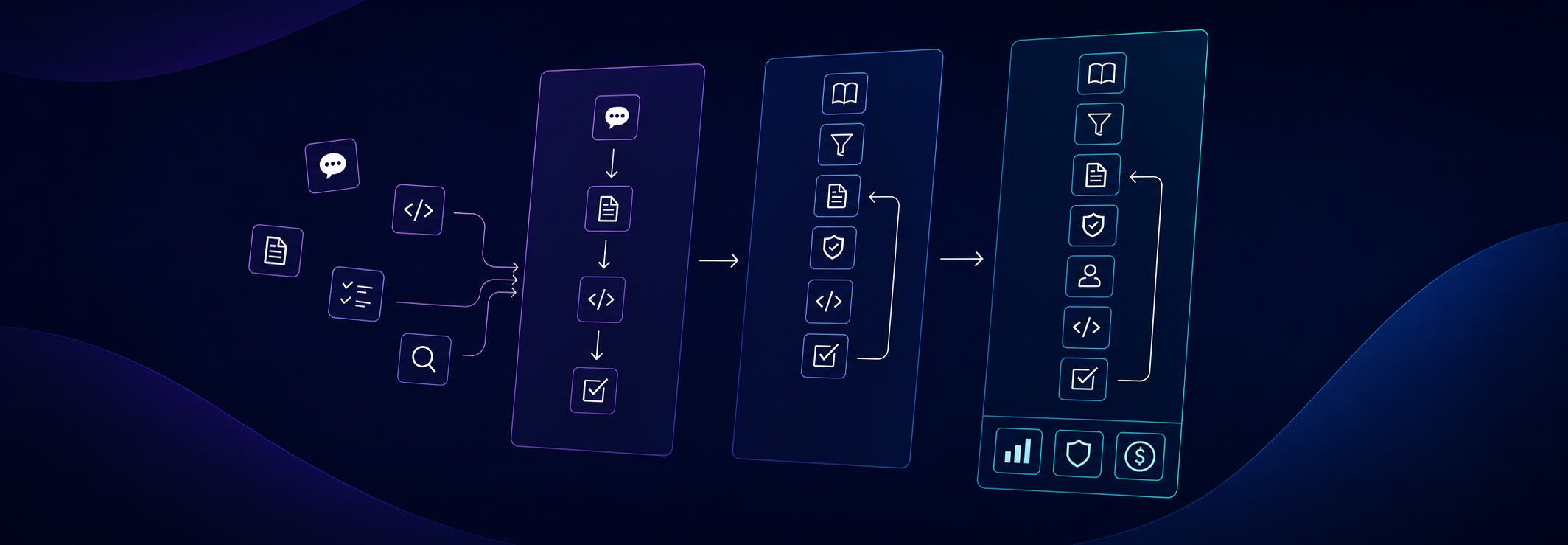
We don't need to invent an entirely new software development process just because AI is involved. We should keep the small process we normally use anyway when working on a change in an existing system. In day-to-day work, we rarely start with code alone. First, we try to understand what needs to be built, for whom, with what constraints, and how that change fits the rest of the system. Only then do we move to implementation, review, and fixes. This doesn't have to be a heavy process. The goal is not to create documentation just to have it, or to pretend that every small change needs an enterprise process. We need a simple split of responsibilities that limits guessing. In the basic version, it has a few stages:- gathering knowledge: what needs to be built, what are the requirements, rules, and constraints;
- preparing the specification: how this change fits the existing system and how to implement it;
- implementation: translating the specification into code;
- review: checking whether the result fits the requirements, architecture, and project rules.
- Knowledge Writer doesn't implement the solution. Its job is to gather and organize knowledge: requirements, business rules, domain context, existing behaviors, and decisions that might affect the change.
- Spec Writer takes that knowledge and turns it into a plan for a specific system or repository. This is where we decide which layer should own the change, which components we'll touch, what API is needed, what edge cases need handling, and how we'll verify the solution.
- Implementer shouldn't reinvent the requirements or architecture. Its job is to translate the specification into code, following the project's rules. Depending on the flow, it can also prepare tests or start with them, if we're working in a TDD variant.
- Reviewer checks the result from another perspective. Not just whether the code compiles, but whether the change meets the requirements, fits the architecture, doesn't duplicate logic, and doesn't introduce another style alongside the existing one.
AI workflow is not the goal
Adding a workflow to AI-assisted development will not solve all problems. A poorly designed process can actually make things worse: increase costs, generate documentation that nobody uses, and add more steps without actual control over quality. A good workflow should stabilize work, not complicate it. It should help define roles, responsibilities, artifacts produced at each stage, and how to verify the result. It should also fit into the tools and practices already used in the project: tests, review, CI, linting, quality analysis, or architecture rules. The point is not to replace the SDLC, but to make AI-assisted development fit into it. Not every project needs the same flow. A complex business domain will require more work on knowledge, rules, and edge cases. A simple CRUD or a single UI screen might only need a lightweight version of this process. The workflow should match the problem being solved, not add process just for the sake of process. When designing such a flow, it is worth looking at a few areas:- Verifiability - can we check that the generated code meets business requirements, not just looks correct?
- Architectural consistency - is AI adding code styles that do not match the existing ones? Are rules placed in the right layers?
- Code quality - are we duplicating logic, hiding complexity, and creating code that nobody will want to touch in a month?
- Tests - are the tests checking system behavior, or just the current implementation?
- Performance - will the solution work on real data, not just a small example from the prompt?
- Cost - what does such a workflow cost: in tokens, requests, review time, and artifact maintenance?
- Security - which tools can AI access, what data can it access, and how do we limit the risk of data leakage, especially PII? Sometimes the problem isn't the prompt itself, but the tool that has too much access to the repository, logs, or test data.